
You can now plan your trips with the Route Planner, making it faster and easier to book several shipments in along your route.
How to Use the Route Optimization Tool
1. Select the Route Planner
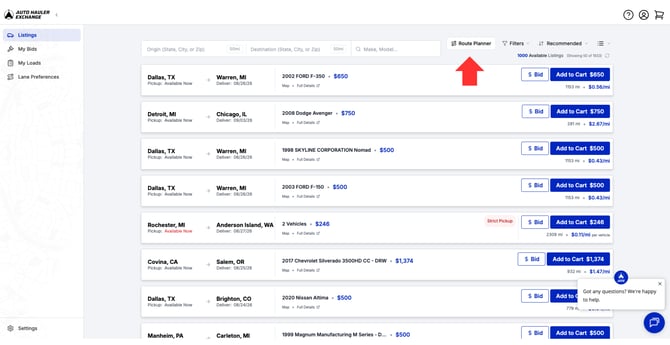
At the top of the Listings Page select the Route Planner button.
2. Pick your Pickup and Drop off locations
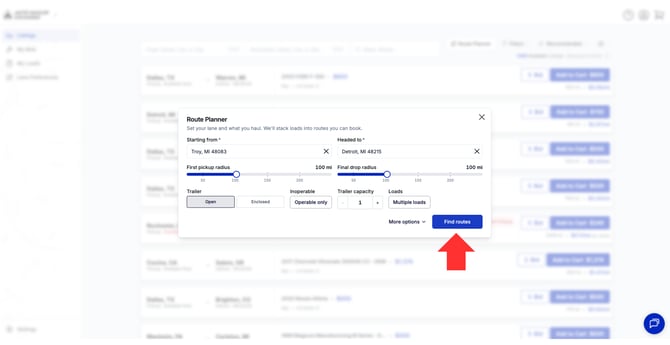
The pickup location will also have the destination city of any active loads, allowing you to view potential backhauls from already booked order. After adjusting the details like trailer type, vehicle type, and search radius, select "Find Routes"
3. Book your loads
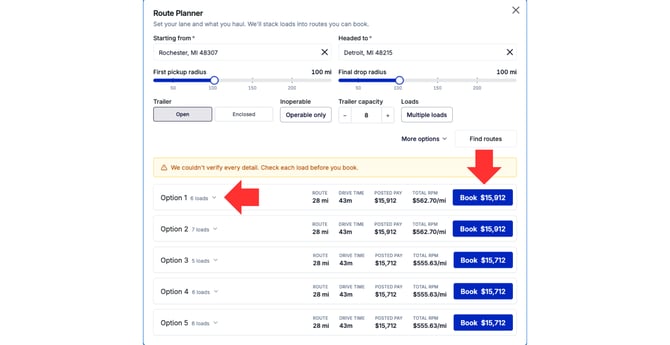
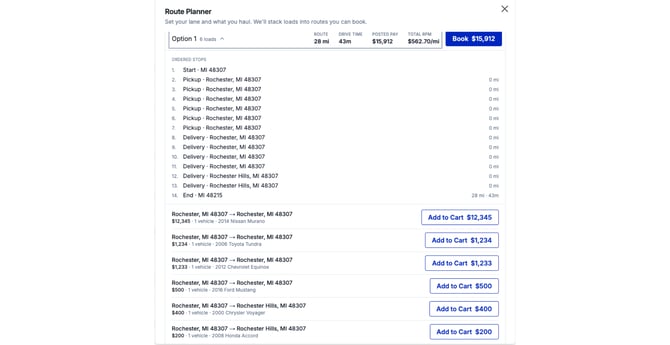
The tool will pull up all routes along the route based on the filters chosen. Selecting the "arrow" will expand and show all loads included in the route, allowing you to add them to your cart separately if needed
Why Use the Route Optimization Tool?
The Route Optimization Tool allows you to effectively and quickly plan out trips based on your locations, truck size and load requirements, cutting down on time needed to find loads and fill your trucks.
Questions?
Feel free to reach out to support@autohaulerx.com should you have any questions!