
Auto Hauler Exchange (AHX) makes paying for loads and managing invoices simple, transparent, and centralized. This article walks through how payments work on the platform, where to find your invoices, and how to manage them efficiently.
Viewing Invoices
To view your invoices, simply click the “Invoices” tab at the top of your screen.

This will bring you to your invoices dashboard.
Here you can see:
- Total invoices
- Outstanding amount
- Average days to pay
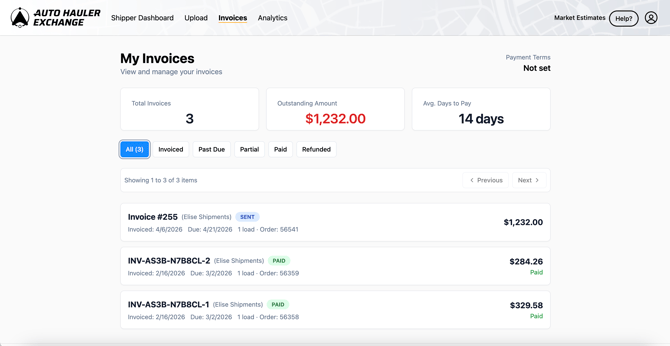
Use the filters to easily navigate through your different invoices.
.png?width=670&height=348&name=KB%20Screenshots%20(14).png)
If you click on an invoice, it will take you to the details of that specific invoice.
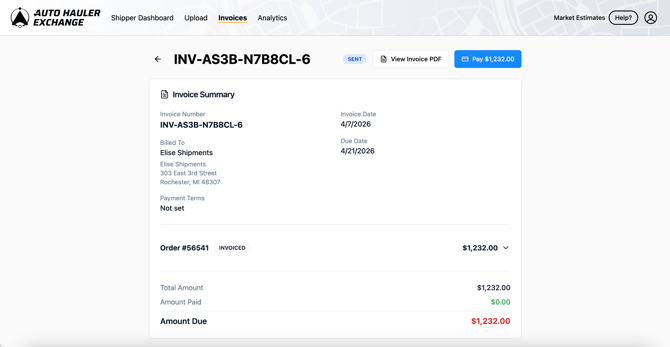
Here you’ll be able to find:
- Invoice summary
- Invoice date
- Due date
- Billing address
- Payment terms
You can also download a PDF of the invoice by clicking "View Invoice PDF."
.png?width=670&height=348&name=KB%20Screenshots%20(18).png)
Paying Invoices
To pay an invoice, locate the invoice using the steps above.
Click into the invoice you wish to pay and then select “Pay.”
.png?width=670&height=348&name=KB%20Screenshots%20(19).png)
Then select the payment method you wish to pay with.
.png?width=670&height=348&name=KB%20Screenshots%20(15).png)
Your processing fee will change depending on what type of payment method you choose.
.png?width=670&height=348&name=KB%20Screenshots%20(16).png)
Once you’ve selected your payment method click “Pay.”
.png?width=670&height=348&name=KB%20Screenshots%20(17).png)
Past Due Invoices
If you have past due invoices, a banner will display on your dashboard to notify and remind you.
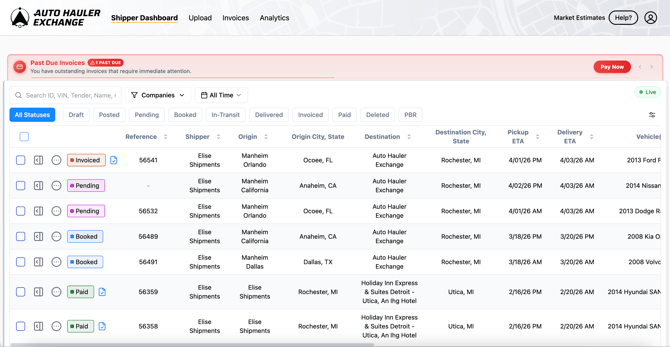
You can pay by clicking on the “Pay Now” button on the banner or going back to your invoices page using the steps above.
.png?width=670&height=348&name=KB%20Screenshots%20(20).png)
Choose your payment method from your saved methods or add a new payment method.
Once you have selected your payment method, click “Pay.”
.png?width=670&height=348&name=KB%20Screenshots%20(21).png)
If you need help, please reach out to support@autohaulerx.com.